Regex tester

Test a JavaScript regular expression and inspect matches, positions, and capture groups.

FluffyShield Protected workspace
FluffyShield

Isolated workspace: other page scripts can't read your files. How FluffyShield works

Trying to find every order number in a block of text?

A regular expression, or regex, is a search rule that finds text by its shape. FluffyBench's Regex tester shows what your pattern catches, where each match starts, and which pieces it saves, all in your browser.

How it works
  1. Type a pattern
  2. Paste the text to search
  3. Turn on Ignore case if capitals don't matter
  4. Read each match card

Limits Patterns follow JavaScript's rules, so a pattern copied from another programming language may need small changes.

Find words and numbers in a block of text

Say you've pasted a long email and want every order number in it. You can't search for one exact word, because each number is different. A regex lets you describe the shape instead: the word order, some spacing, then a number. Think of it as a highlighter that only marks text of that shape.

Here's that rule written as a pattern, (order)\s+(\d+), with Ignore case on, searching the text Order 42; order 7.
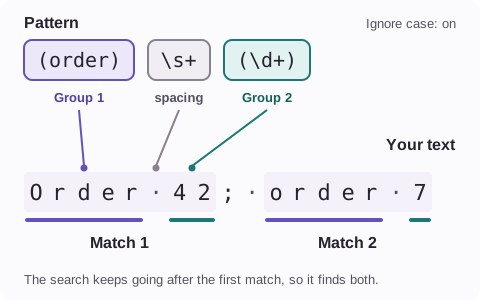
The pattern (order)\s+(\d+) split into (order), marked Group 1, then \s+ for the spacing, then (\d+), marked Group 2. In Order 42; order 7 it finds Order 42 and order 7, with the word and the number underlined in each.
Parentheses save a piece of each match. Ignore case lets Order and order both count, and your text keeps its capital letter. How we measured

Want to know what \s and \d mean? Our guide to JavaScript regex patterns, flags, and groups walks through the symbols.

Testing a pattern in FluffyBench's Regex tester

Here's the order-number search from start to finish, as it looks on a phone. On a wider screen, the text and the matches sit side by side.
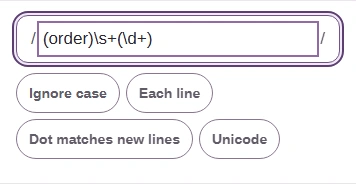
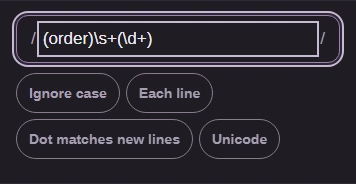
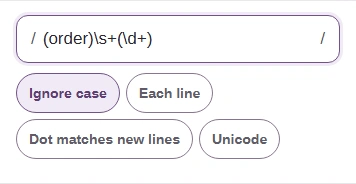
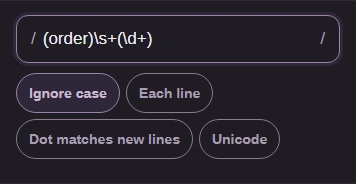
  1. FluffyBench Regex tester pattern field holding (order)\s+(\d+), with the option buttons below it.
    FluffyBench Regex tester pattern field holding (order)\s+(\d+), with the option buttons below it.
    Step 1. Type your pattern: (order)\s+(\d+).
    1. Type the pattern between the slashes.
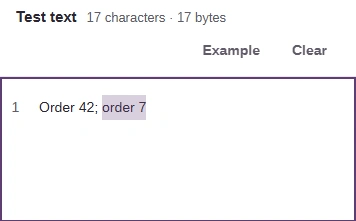
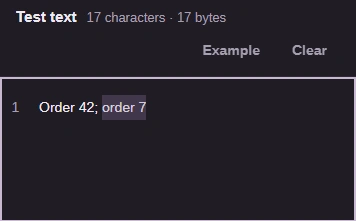
  2. Test text box holding Order 42; order 7, with only order 7 highlighted.
    Test text box holding Order 42; order 7, with only order 7 highlighted.
    Step 2. Paste the text to search. Short text is searched as you type, so the lowercase order 7 lights up already.
    1. Paste your text under Test text.
  3. Ignore case switched on, beside Each line, Dot matches new lines and Unicode.
    Ignore case switched on, beside Each line, Dot matches new lines and Unicode.
    Step 3. Turn on Ignore case, and Order 42 is found too.
    1. Turn on Ignore case.
  4. The Test text and Matches tabs, with Matches selected.
    The Test text and Matches tabs, with Matches selected.
    Step 4. On a phone, your text and the results sit on two tabs. Open Matches.
    1. Open the Matches tab.
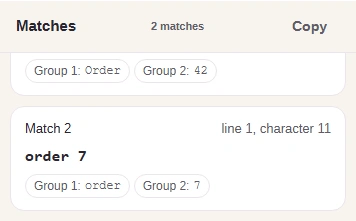
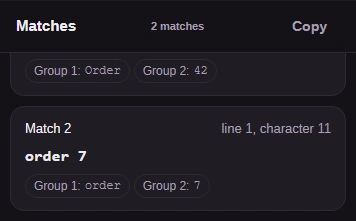
  5. Matches view with 2 matches and a Copy button. Match 2 is order 7 at line 1, character 11, with Group 1: order and Group 2: 7.
    Matches view with 2 matches and a Copy button. Match 2 is order 7 at line 1, character 11, with Group 1: order and Group 2: 7.
    Step 5. Read the cards: 2 matches. Each card shows one match, where it starts and the pieces it saved.
    1. Where this match starts in your text.
    2. Group 1 and Group 2 are the parts in parentheses.
    3. Copy puts a numbered list of matches on your clipboard.

Where does a match start?

The match card and the copied list point to the same spot in two ways. The card gives a line, and a character on that line counted from 1. The copied list gives the index: the position in the whole text, counted from 0.
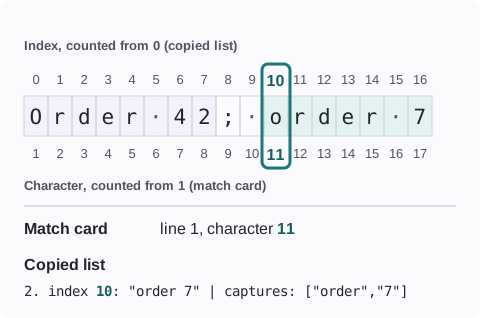
The text Order 42; order 7 on a ruler. order 7 starts at index 10, counting from 0, which is character 11, counting from 1. The match card reads line 1, character 11; the copied list reads index 10.
Same letter, two numbers. On later lines the index keeps counting from the start of the whole text, while the card starts each line again at 1.

Emoji can make the index jump. In our check, JavaScript counted 😀 as two positions, so the letter right after it sits at index 2. If a position looks off, FluffyBench's Unicode inspector lets you look at each character in your text.

Need to inspect Unicode code points?

Why you might see only some result cards

A loose pattern can find hundreds of matches, so the tester has two limits: one for what it shows, and one for how far it searches.

FluffyBench shows the first 100 matches as cards and tells you the full count, and Copy still gives you the whole list. Here's a list of 150 order lines, typed for illustration.
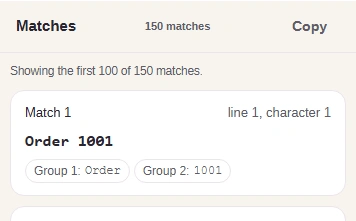
Matches view: 150 matches, the notice Showing the first 100 of 150 matches., and Match 1, Order 1001, with Group 1: Order and Group 2: 1001.

More than 100 matches: the first 100 cards

The notice above the cards gives the full count; only the display is limited.

If a search finds more than 5,000 matches, it stops instead. Here's a search for the letter a in a run of 5,001 of them: one match too many.

Error message: The regex produced more than 5,000 matches. Narrow the pattern or input.

Match 5,001 found: the search stops

No cards appear. Narrow the pattern or search a shorter piece of text.

When the tester shows a problem, or a different tool fits

Here's the order pattern with its last closing parenthesis missing, (order)\s+(\d+. FluffyBench says which group is open and where.

Problem message: Invalid regex, Line 1, column 11, This group is missing a closing parenthesis.

Invalid pattern

Add the missing parenthesis and the search runs again on its own.

No matches found. Check letter case first: without Ignore case, Order and order are different words.

Timed out. A pattern that runs for more than five seconds is stopped so the page stays usable. Simplify the pattern or search a shorter piece of text.

A Test button appeared. With very long text, FluffyBench stops searching as you type. Press Test when your pattern is ready.

You only need to see what changed between two drafts

Open FluffyBench's Text diff

It compares the two versions directly and marks the changes, with no pattern to write.

Search FluffyBench