
How are PEM, DER, JWK, X.509, CSR, and SSH keys different?
Asked for a certificate but handed a PEM file? Learn which names describe what's inside, which describe the packaging, and how to choose what your app needs.
Is it a public key, a certificate, or a certificate request?
A bare public key is the key itself; a certificate adds an issuer's signed claims, and a CSR asks an issuer for a certificate. Think of them as a key, a signed identity card, and an application for that card.

Different objects, different jobs
An X.509 certificate associates a public key with a subject, such as a website, and carries validity dates and rules for using that key. A CSR means certificate signing request: it contains the public key and the details you'd like the issuer to put on a certificate. It's signed with the matching private key, which isn't included in the request.
The issuer can approve, change, or reject the requested details. That's why a CSR isn't an issued certificate, even when both contain the same public key. Changing how you save the request won't turn it into a certificate.
Why can the same object be PEM or DER?
DER is structured binary data; PEM wraps those bytes in a labeled text envelope. Here's one real public key in both forms: decoding the PEM body gives you the DER bytes beside it.

The same contents, two packages
The BEGIN and END lines say what the PEM block contains. Between them, Base64 spells binary bytes using text characters, so you can paste the block into a text field. A program that asks for DER expects the binary version instead. Certificates and CSRs can use that same envelope pattern with their own labels.
How do JWK and SSH represent a public key?
JWK writes a key as named JSON fields; OpenSSH writes a key type followed by a packed value. These two examples carry the same Ed25519 public key as the PEM and DER pair.

One public key, two text layouts
JWK means JSON Web Key. Its field names depend on the kind of key: in this Ed25519 example, kty names the key family, crv names the curve, and x holds the public value. A JSON Web Key Set, or JWKS, groups keys in a keys list. A program asking for a key set expects that outer list, even if you've got just one key.
SSH is the format you'll often meet when setting up a remote login. A public-key line can look like a long piece of encoded text, just as PEM does, but the two layouts aren't interchangeable. You'll need the representation the receiving program asks for.
Which object and format does the receiving program need?
Match both the object and its encoding to the app's request. A PEM public key won't do the job of a PEM certificate, even though their text envelopes look similar.

Recognize, identify, match
A binary DER file won't have a readable BEGIN line. If the request just says 'send a PEM,' it's missing a detail: ask whether the app needs a public key, certificate, or CSR. Renaming the file doesn't change its contents. A PEM file can also hold several blocks, so a bundle and a single certificate aren't always acceptable in the same place.
For the separate question of what a signature or fingerprint can prove, read our guide to checksums and digital signatures.
Doing it in FluffyBench
FluffyBench's Certificate and public key inspector reads public fields in your browser. Here's a public certificate you can try with Example.
-


Step 1. Choose Certificate to read a certificate's contents. - Choose Certificate.
-
-
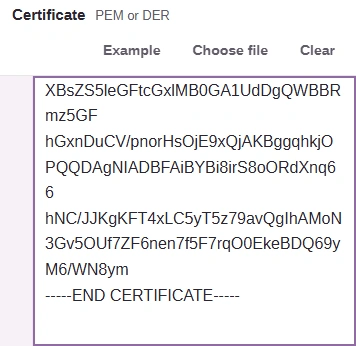
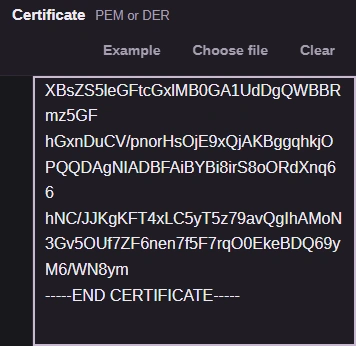
Step 2. Load Example to try the public sample. For your own certificate, paste its PEM text or use Choose file for a local PEM or DER file; inspection updates as you paste. - Example loads a public sample.
- Paste public certificate text here.
- Choose file opens a local certificate.
-
-


Step 3. Read Contents only: FluffyBench displays the certificate's claims without checking its signature, hostname, dates, revocation or trust. - Read the scope of the inspection.
-
-
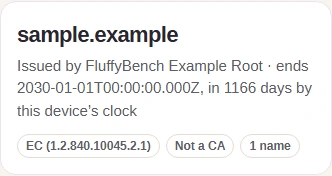
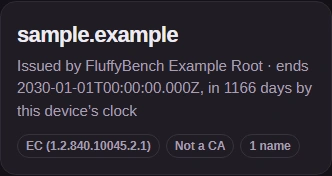
Step 4. Read the decoded summary: the sample names sample.example and says it was issued by FluffyBench Example Root. - Read the certificate's subject name.
- Read the issuer named in the certificate.
-
-


Step 5. Copy all copies the inspection report for your notes. - Copy all copies the report.
-
The other inspection tasks are Certificate chain, Signing request (CSR), JWK or JWKS, and SSH public key. They match the objects and representations you've just met; SSH public key inspects a public line and its fingerprint, without converting it to PEM or JWK.
Keep private keys to yourself: someone who gets one may be able to sign or decrypt as you. The inspector needs public material and rejects private keys. JWK can contain private or symmetric key values, and an OpenSSH private-key file is different from a public-key line. Don't paste those secrets into a browser field, clipboard, chat, or log.
Want to inspect your own public certificate, request, or key?
Read the public fields and fingerprint using the inspection task that matches your input.