JWT Decoder

Read a JWT header and payload without verifying its signature or claims.

FluffyShield Protected workspace
FluffyShield

Isolated workspace: other page scripts can't read your files. How FluffyShield works

Read your JWT’s header and claims

Turn a JWT’s long string into readable field names and values. FluffyBench’s JWT Decoder helps you see what the token says.

What’s inside a JWT?

A JWT is a text package carrying named values called claims. Picture the 3-part form as a postcard: Header is the label, Payload is the message, and the signature is a stamp an app can check.

Three token segments, separated by dots, map to Header (type and declared algorithm), Payload (claims), and signature bytes. The segment text is shortened.
Dots separate the parts; the encoded text is shortened here so you can see the structure. How we reviewed

The header and payload use Base64URL, an encoding that makes data safe to put in a URL. It isn’t encryption: someone holding the token can read those parts.

Read a decoded JWT in FluffyBench

For this walkthrough, we've pasted a complete sample token published in RFC 7519, the JWT standard, into FluffyBench's JWT Decoder. The same token appears in the field explanation below.
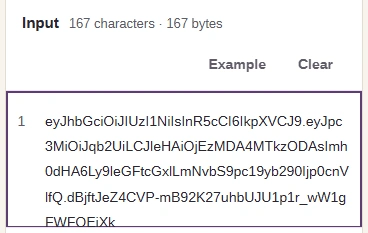
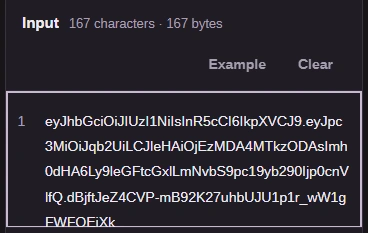
  1. Paste a complete three-part JWT into Input.
    Paste a complete three-part JWT into Input.
    Step 1. Paste a complete three-part JWT into Input.
    1. Paste the token without a Bearer prefix.
    2. Example is an alternative: it fills Input with a synthetic practice token.
  2. Choose Decode JWT to turn the input into readable fields.
    Choose Decode JWT to turn the input into readable fields.
    Step 2. Choose Decode JWT to turn the input into readable fields.
    1. Decode JWT reads the current Input.
  3. In Result, check that the claims match the token you meant to inspect.
    In Result, check that the claims match the token you meant to inspect.
    Step 3. In Result, check that the claims match the token you meant to inspect.
    1. iss names joe as this sample's issuer.
  4. Copy puts the notice, Header and Payload on your clipboard.
    Copy puts the notice, Header and Payload on your clipboard.
    Step 4. Copy puts the notice, Header and Payload on your clipboard.
    1. Copy saves the displayed report to your clipboard.

What the decoded JWT fields mean

In the RFC 7519 sample, Header describes the token and Payload contains its claims. Here are its fields together, with the notice that applies to them:
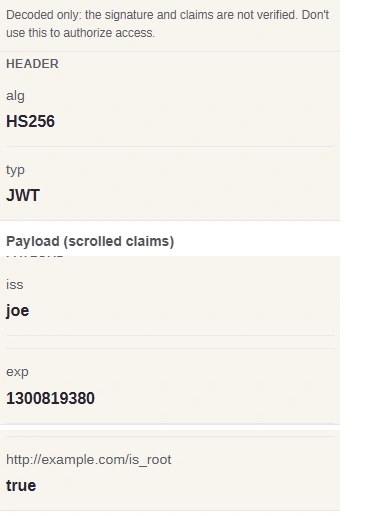
The published JWT decoded into Header alg HS256 and typ JWT, and Payload iss joe, exp 1300819380 and http://example.com/is_root true, beneath the unverified notice.

Result: notice, Header and Payload

  1. Unverified notice

    Readable fields describe what the token says; access decisions belong to your app's verifier.

  2. Declared algorithm

    alg declares HS256; it doesn't set your app's trusted algorithm.

  3. Token type

    typ labels this token JWT.

  4. Payload: issuer

    iss names the issuer: joe.

  5. Expiration

    exp is the expiration time in seconds since January 1, 1970. FluffyBench's Timestamp Converter can turn it into a date with seconds as the input unit.

  6. Custom claim

    The URL-like name is a custom claim, not a link to open. Its value is true; the issuing app defines its meaning.

Crops from the same Result, stacked in reading order to show fields from its scrollable pane.

Need to convert a JWT time claim to a date?

Why won’t FluffyBench decode a five-part token?

A five-part token is the encrypted form, called JWE. It needs decryption before its claims can be read.
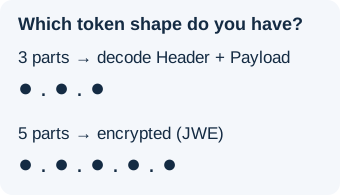
Three parts can be decoded into Header and Payload; five parts identify the encrypted JWE form.
Count the parts separated by dots to distinguish these two forms.

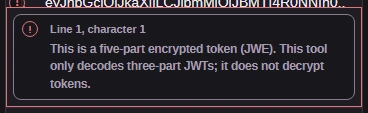
FluffyBench’s JWT Decoder reports a five-part input in Problems:
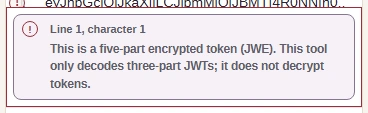
  1. A five-part encrypted token stops with this message.
    A five-part encrypted token stops with this message.
    Step 1. A five-part encrypted token stops with this message.
    1. This JWT Decoder doesn't decrypt JWE inputs.

An incomplete token or a header or payload that isn't a JSON object will cause a decoding error. The input limit is 16 MiB; a larger paste is refused before decoding.

Keep live account tokens out of shared places

Use a sample while you’re learning. A live token may give whoever holds it access to an account, so keep it out of shared documents, chats and saved clipboard histories. If you’ve exposed one, follow the issuing service’s steps to revoke or replace it.

Related FluffyBench tools and guides

If you've also been given a public key to inspect, FluffyBench's Certificate and public key inspector shows its fields and fingerprint. That's a separate input from the token you decode here.

For the difference between reading claims and checking that they're trustworthy, see JWT decoding and verification.

Need to inspect the key used with a JWT?

Search FluffyBench