Text counter

Count whitespace-delimited words, Unicode code points and lines without changing your text.

FluffyShield Protected workspace
FluffyShield

Isolated workspace: other page scripts can't read your files. How FluffyShield works

How long is your text in words, characters and lines?

Checking a writing limit? Paste your text into FluffyBench's Text Counter and you'll see its words, characters and lines as you type. It's counted right in your browser, so your text isn't uploaded anywhere.

One surprise worth knowing: a single emoji can count as two characters.

How it works
  1. Paste or type your text
  2. Read Words, Characters or Lines
  3. Copy or download the counts

Counted on your device

Nothing is sent anywhere to count it; the counting happens in your browser.

Live totals

Words, characters and lines change with every edit you make.

Nothing gets edited

Counting never edits what you pasted, so the draft you check is the draft you send.

Limits Paste or type plain text; there's no file picker.

Which count matches your limit?

Start with the wording of your limit. FluffyBench gives you three totals, each with its own rule, so read the card your limit names.
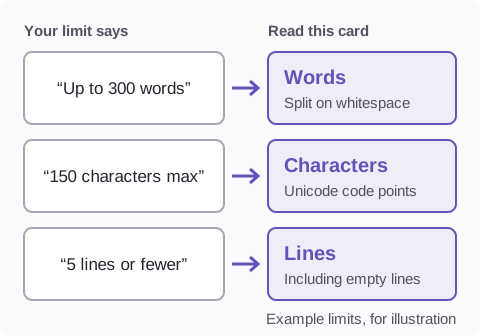
Three example limits, each pointing to one card. Up to 300 words points to Words, split on whitespace. 150 characters max points to Characters, Unicode code points. 5 lines or fewer points to Lines, including empty lines.
The small print under each card in FluffyBench names the same rule. How we measured

Think of the three totals as three rulers laid over the same text. They measure different things, so they won't agree, and a number that surprises you doesn't mean your text changed. If a site spells out its own way of counting, its rule is the one to follow.

Counting your text in FluffyBench

Here's the whole job with a short sample, “café 👍🏽 naïve”: paste it, read the card you need, then keep the totals.
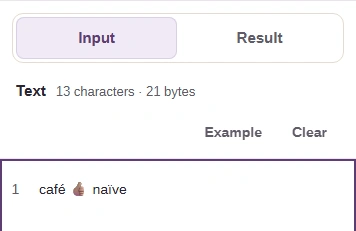
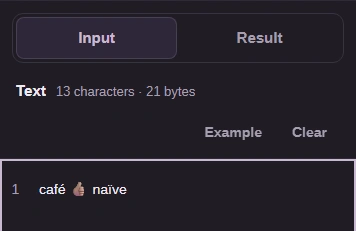
  1. FluffyBench Text Counter on a phone: the Text box holds café 👍🏽 naïve, above it are the Input and Result tabs.
    FluffyBench Text Counter on a phone: the Text box holds café 👍🏽 naïve, above it are the Input and Result tabs.
    Step 1. Paste or type the exact version you'll submit. The totals update as you type; a very long draft shows a Count button to press instead.
    1. Paste your text in the Text box.
    2. On a phone, tap Result to see the totals.
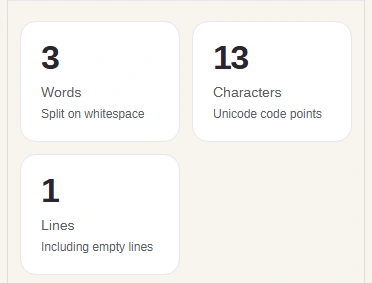
  2. The Words card shows 3, the Characters card shows 13 and the Lines card shows 1.
    The Words card shows 3, the Characters card shows 13 and the Lines card shows 1.
    Step 2. Read the card your limit names. The sample shows 12 symbols, but the thumbs-up counts as two, so Characters says 13.
    1. Words: 3 chunks between spaces.
    2. Characters: 13 Unicode code points.
    3. Lines: 1, since there's no line break.
  3. The Counts heading with the Copy counts and Download buttons beside it.
    The Counts heading with the Copy counts and Download buttons beside it.
    Step 3. Keep the totals with your draft. Both buttons give you the same short note, one total per line.
    1. Copy counts puts all three totals on your clipboard.
    2. Download saves them as a text file.

Why do spaces decide the word count?

The Words card counts the chunks between spaces. Punctuation never splits anything; it stays attached to the word beside it.
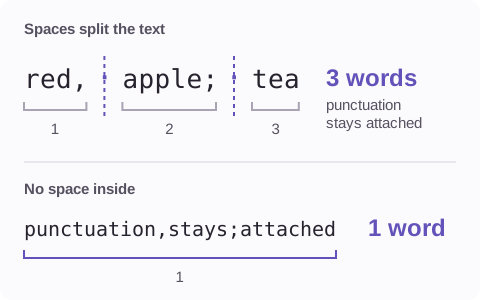
red, apple; tea has two spaces, so it counts as 3 words. punctuation,stays;attached has no space inside, so it counts as 1 word.
Tabs and line breaks split words the same way a space does.

It's a counting rule, not a dictionary, so any run of characters between spaces counts as a word. That works well for languages that put spaces between words. Chinese or Japanese written without spaces comes out as one long word, so Words isn't the right check there.

Why can one emoji count as two characters?

On screen, the skin-tone thumbs-up looks like one symbol. Inside the text it's two pieces snapped together, a plain thumbs-up and a skin-tone patch. Unicode calls each piece a code point, and the Characters card counts every piece.
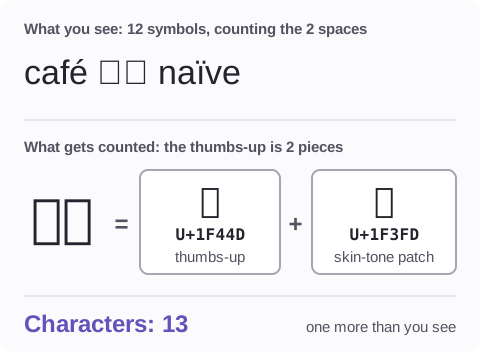
café 👍🏽 naïve shows 12 symbols, counting the spaces. The skin-tone thumbs-up is made of U+1F44D and U+1F3FD, so FluffyBench's Characters card reports 13.
That extra piece is why the sample's Characters card said one more than the symbols you can see.

Accented letters can do the same thing: an é can be stored as one piece, or as a plain e followed by a separate accent mark, so two words that look identical can give different totals. For the longer story of code points and look-alike text, read the Unicode guide.

Why does a line break at the end add a line?

The Lines card counts every line your text has, empty ones included. A line break at the very end starts a new, empty last line, and that line counts too.
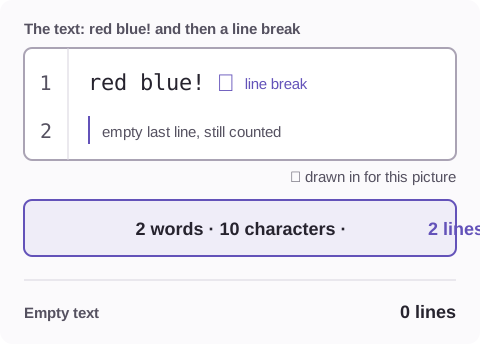
red blue! followed by one line break. Line 1 holds the words and line 2 is empty. FluffyBench reports 2 words, 10 characters and 2 lines. Empty text has 0 lines.
The break itself is one of the 10 characters. Empty text has 0 lines, since there's nothing to count.

Blank lines between paragraphs count the same way. It doesn't matter whether the text came from Windows or a Mac, either: each kind of line break counts once.

Other FluffyBench text tools for this job

If stray or doubled spaces are padding your totals, FluffyBench's Text Cleaner can trim and collapse them before you count. If two drafts give different totals, FluffyBench's Text Diff shows exactly which lines changed.

Need to clean spaces or line endings?

Need to compare the text behind two counts?

Search FluffyBench